---
title: "Runtime Error: The Connection for this process has been disrupted or the connection couldn't be established."
description: Troubleshoot AudBase Runtime Error -10002 when the client can’t connect to the 4D server—step-by-step reconnection guide plus Helpdesk contact.
---
[Skip to content](https://support.audbase.com/knowledgebase/runtime-error-the-connection-for-this-process-has-been-disrupted-or-the-connection-couldnt-be-established#main-content)
English
Show submenu for translations
[Fill out a Support Request](https://support.audbase.com/knowledgebase/kb-tickets/new?hsLang=en)
[](https://support.audbase.com/?hsLang=en)
- [Home](https://www.audbase.com/)
- [Blog](https://blog.audbase.com/)
- Support
Show submenu for Support
- [Request Support](https://share.hsforms.com/167lFxVi8TKqHSa4CuG4-uQtl9p1)
- [Knowledge Base](https://support.audbase.com/)
- [Download AudBase Client](https://support.audbase.com/downloads)
- [Contact Us](https://www.audbase.com/contact-and-support)
- [About](https://www.audbase.com/about-us)
Open main navigation
Close main navigation
- [Home](https://www.audbase.com/)
- [Blog](https://blog.audbase.com/)
- Support
Show submenu for Support
- [Request Support](https://share.hsforms.com/167lFxVi8TKqHSa4CuG4-uQtl9p1)
- [Knowledge Base](https://support.audbase.com/)
- [Download AudBase Client](https://support.audbase.com/downloads)
- [Contact Us](https://www.audbase.com/contact-and-support)
- [About](https://www.audbase.com/about-us)
- English
Show submenu for translations
- [Fill out a Support Request](https://support.audbase.com/knowledgebase/kb-tickets/new)
- [Contact us](mailto:support@audbase.com)
[Contact us](mailto:support@audbase.com)
Welcome to the AudBase Knowledge Base
- There are no suggestions because the search field is empty.
1. [AudBase Knowledge Base](https://support.audbase.com/knowledgebase?hsLang=en)
2. [Troubleshooting](https://support.audbase.com/knowledgebase/troubleshooting?hsLang=en)
3. [Connectivity](https://support.audbase.com/knowledgebase/troubleshooting?hsLang=en#connectivity)
July 8, 2025
# Runtime Error: The Connection for this process has been disrupted or the connection couldn't be established.
## Error Code -10002
If the AudBase Client is unable to connect the the server for any reason, it will display the following error dialog box:
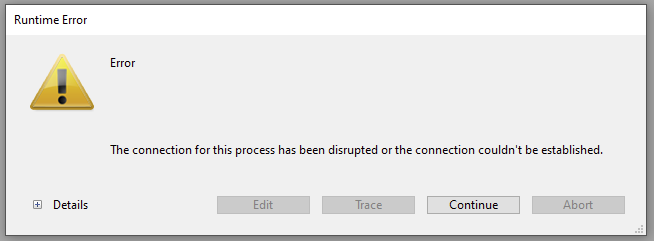
If you select the **+** to expand the details pane you are given the error number -10002 and the error description:
"The connection for this process has been disrupted or the connection couldn't be established."
This message may occur due to a loss of internet connectivity, changes to your clinic's firewall, or their problems with their network.
There are a few steps you can take to attempt to manually reconnect to the server:
1. On the displayed **Runtime Error** window, Select the **Continue** button to bring up the Connection to 4D Server Window:
2. If an AudBase server (highlighted here in red) is found, you may select it and then select **OK.** If no servers are displayed, continue to step 3.
3. Select the **Custom** tab, to manually enter your server information. The database name is usually **audbase** and if you don't know the network address, please give us a call at the number listed at the bottom of this page.
4. Select **OK** and the AudBase Client will attempt to reconnect.
5. If the client is not successful at re-connecting or if you are prompted to enter the database name and network address each time you start AudBase call our helpdesk at 1-888-959-6790 or submit a **[request for support](https://share.hsforms.com/167lFxVi8TKqHSa4CuG4-uQtl9p1)** to create a ticket.
- [Troubleshooting](https://support.audbase.com/knowledgebase/troubleshooting?hsLang=en#main-content)
- [Devices and Equipment](https://support.audbase.com/knowledgebase/troubleshooting?hsLang=en#devices-and-equipment)
- [Connectivity](https://support.audbase.com/knowledgebase/troubleshooting?hsLang=en#connectivity)
- [Workflow](https://support.audbase.com/knowledgebase/troubleshooting?hsLang=en#workflow)
- [Instrument Integrations](https://support.audbase.com/knowledgebase/instrument-integrations?hsLang=en#main-content)
- [GSI Instruments](https://support.audbase.com/knowledgebase/instrument-integrations?hsLang=en#gsi-instruments)
- [Natus / Otometrics / Interacoustics](https://support.audbase.com/knowledgebase/instrument-integrations?hsLang=en#natus-otometrics-interacoustics)
- [Accounts / Preferences](https://support.audbase.com/knowledgebase/accounts-preferences?hsLang=en)
- [Documentation](https://support.audbase.com/knowledgebase/documentation?hsLang=en)
- [User Guide](https://support.audbase.com/knowledgebase/user-guide?hsLang=en)
- [Home](https://www.audbase.com/)
- [Blog](https://blog.audbase.com/)
- Support
- [Request Support](https://share.hsforms.com/167lFxVi8TKqHSa4CuG4-uQtl9p1)
- [Knowledge Base](https://support.audbase.com/)
- [Download AudBase Client](https://support.audbase.com/downloads)
- [Contact Us](https://www.audbase.com/contact-and-support)
- [About](https://www.audbase.com/about-us)
[](http://audbase.com)
[mailto:email@email.com](mailto:email@email.com)
Copyright © 2026, AudSoft, Inc.