---
title: GSI-39 AutoTymp Configurations
description: Quick guide to installing the GSI-39 driver and configuring the COM port in AudBase for seamless tympanometry data transfer.
---
[Skip to content](https://support.audbase.com/knowledgebase/gsi39#main-content)
English
Show submenu for translations
[Fill out a Support Request](https://support.audbase.com/knowledgebase/kb-tickets/new?hsLang=en)
[](https://support.audbase.com/?hsLang=en)
- [Home](https://www.audbase.com/)
- [Blog](https://blog.audbase.com/)
- Support
Show submenu for Support
- [Request Support](https://share.hsforms.com/167lFxVi8TKqHSa4CuG4-uQtl9p1)
- [Knowledge Base](https://support.audbase.com/)
- [Download AudBase Client](https://support.audbase.com/downloads)
- [Contact Us](https://www.audbase.com/contact-and-support)
- [About](https://www.audbase.com/about-us)
Open main navigation
Close main navigation
- [Home](https://www.audbase.com/)
- [Blog](https://blog.audbase.com/)
- Support
Show submenu for Support
- [Request Support](https://share.hsforms.com/167lFxVi8TKqHSa4CuG4-uQtl9p1)
- [Knowledge Base](https://support.audbase.com/)
- [Download AudBase Client](https://support.audbase.com/downloads)
- [Contact Us](https://www.audbase.com/contact-and-support)
- [About](https://www.audbase.com/about-us)
- English
Show submenu for translations
- [Fill out a Support Request](https://support.audbase.com/knowledgebase/kb-tickets/new)
- [Contact us](mailto:support@audbase.com)
[Contact us](mailto:support@audbase.com)
Welcome to the AudBase Knowledge Base
- There are no suggestions because the search field is empty.
1. [AudBase Knowledge Base](https://support.audbase.com/knowledgebase?hsLang=en)
2. [Instrument Integrations](https://support.audbase.com/knowledgebase/instrument-integrations?hsLang=en)
3. [GSI Instruments](https://support.audbase.com/knowledgebase/instrument-integrations?hsLang=en#gsi-instruments)
June 18, 2025
# GSI-39 AutoTymp Configurations
## A quick guide to installing the GSI-39 driver and configuring the COM port in AudBase for seamless tympanometry data transfer.
ADMIN NOTE: You will need Administrative rights on the workstation to install the GSI-39 driver, if it has not been installed previously.
---
### Driver Installation
The GSI-39 Auto-Tymp is installed with a driver that can allow it to create a virtual COM port. A copy of this driver can be found here:
[GSI-39 Driver](http://audsoftftp.com/Drivers/GSI%2039%20USB%20Driver.zip)
After installing the driver, the GSI-39 will be displayed in device manager. If a yellow triangle is displayed next to the device name in device manager, the correct driver has not been detected. Disconnecting and reconnecting the device from the workstation will usually resolve this issue.
---
### Serial Port Settings
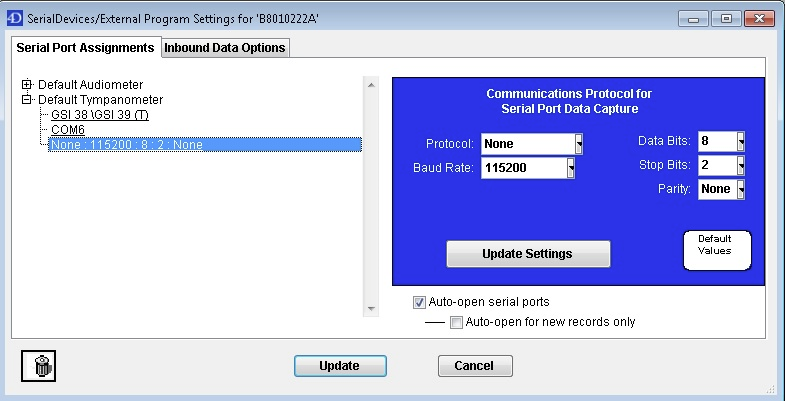
After the device has been successfully recognized by the workstation, you must configure the serial or COM port settings within AudBase.
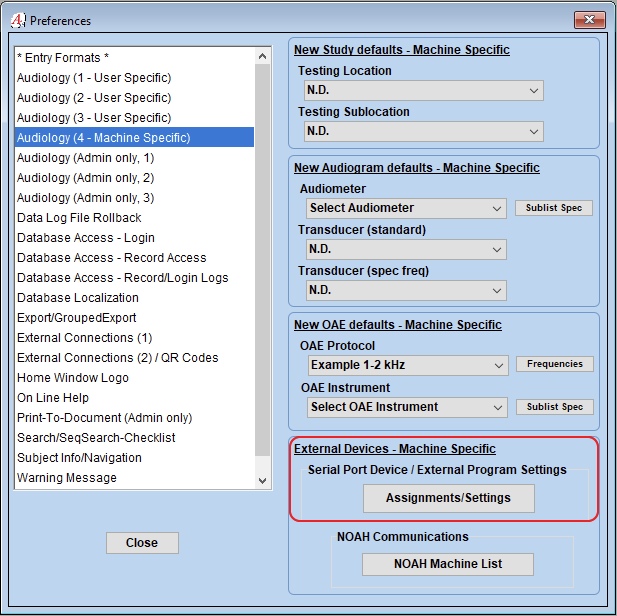
These Machine Specific Preference settings can be found by navigating to **File**, then selecting **Preferences**, and **Audiology (4-Machine Specific)**.
The following COM port settings must still be set up in AudBase:
- [Troubleshooting](https://support.audbase.com/knowledgebase/troubleshooting?hsLang=en#main-content)
- [Devices and Equipment](https://support.audbase.com/knowledgebase/troubleshooting?hsLang=en#devices-and-equipment)
- [Connectivity](https://support.audbase.com/knowledgebase/troubleshooting?hsLang=en#connectivity)
- [Workflow](https://support.audbase.com/knowledgebase/troubleshooting?hsLang=en#workflow)
- [Instrument Integrations](https://support.audbase.com/knowledgebase/instrument-integrations?hsLang=en#main-content)
- [GSI Instruments](https://support.audbase.com/knowledgebase/instrument-integrations?hsLang=en#gsi-instruments)
- [Natus / Otometrics / Interacoustics](https://support.audbase.com/knowledgebase/instrument-integrations?hsLang=en#natus-otometrics-interacoustics)
- [Accounts / Preferences](https://support.audbase.com/knowledgebase/accounts-preferences?hsLang=en)
- [Documentation](https://support.audbase.com/knowledgebase/documentation?hsLang=en)
- [User Guide](https://support.audbase.com/knowledgebase/user-guide?hsLang=en)
- [Home](https://www.audbase.com/)
- [Blog](https://blog.audbase.com/)
- Support
- [Request Support](https://share.hsforms.com/167lFxVi8TKqHSa4CuG4-uQtl9p1)
- [Knowledge Base](https://support.audbase.com/)
- [Download AudBase Client](https://support.audbase.com/downloads)
- [Contact Us](https://www.audbase.com/contact-and-support)
- [About](https://www.audbase.com/about-us)
[](http://audbase.com)
[mailto:email@email.com](mailto:email@email.com)
Copyright © 2026, AudSoft, Inc.